

Shared attributes, a faster table, and dozens of fixes
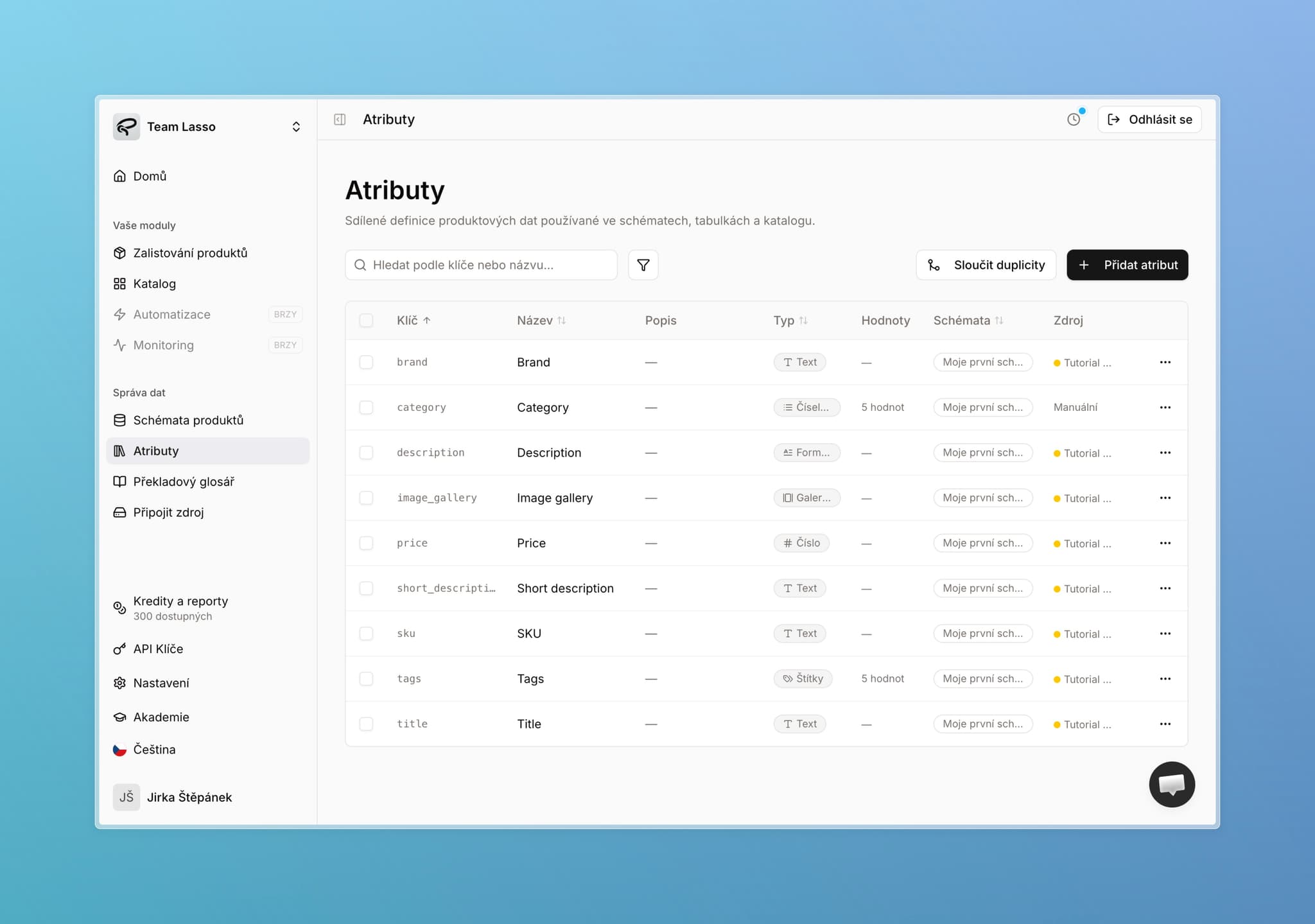
Let's start with the main change. It comes down to one thing: stop maintaining the same information in ten different places.
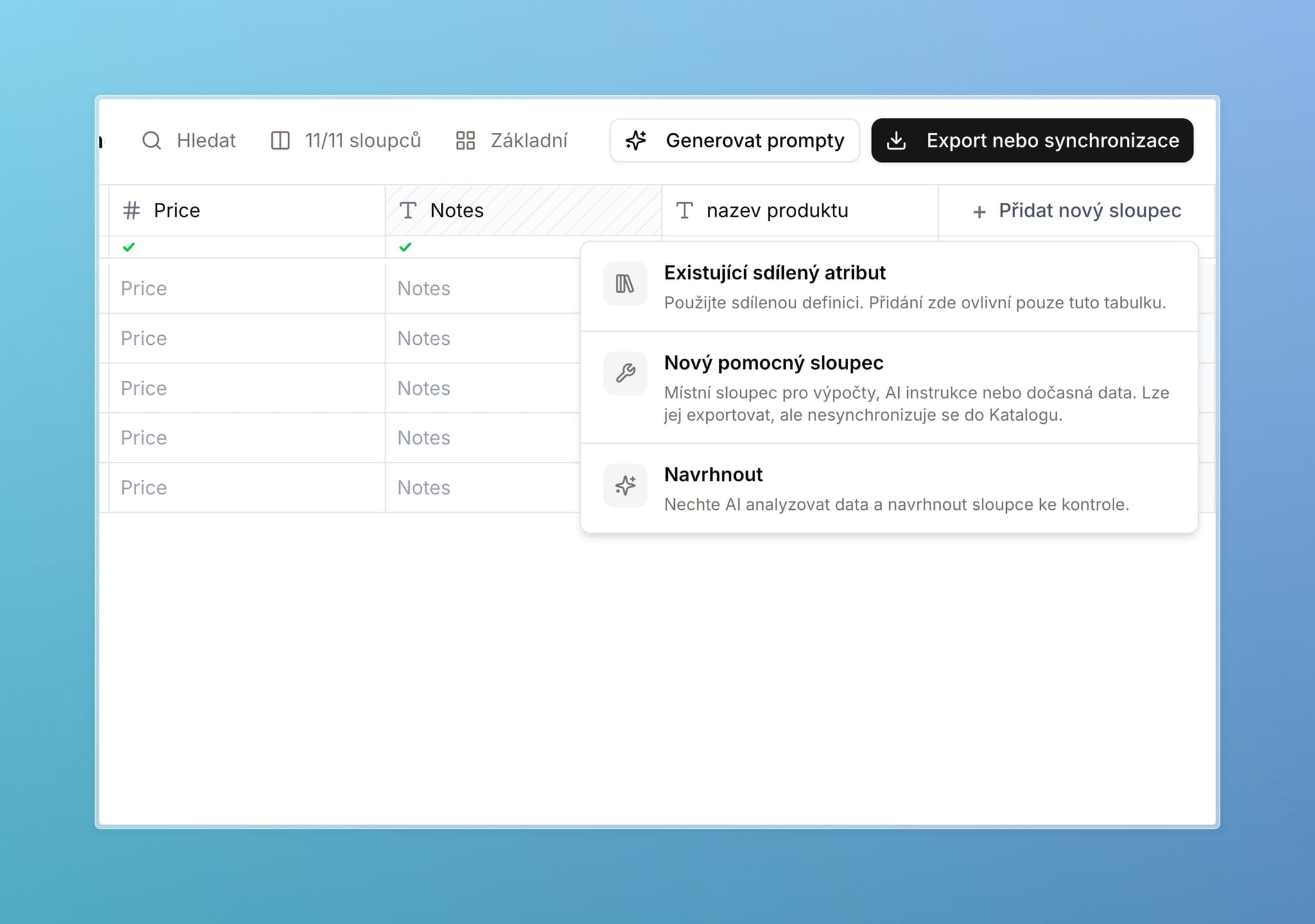
Every column in a table now knows what it is — a real product attribute that belongs in your store, or just a working note for your team. Lasso handles the rest.
You do not need to do anything. By the time you read this, the change is already live — rolled out overnight, with no downtime. Your data is exactly as it was. If anything looks off, reach out anytime.
What's in this update:
- Shared attributes and helper columns — one attribute definition for the whole app, no more chasing changes across schemas by hand
- A faster, smoother table — a clear speed-up on large datasets, Excel-like navigation, table duplication
- Dozens of fixes and improvements — a rewritten credits system, AI image fixes, export, and catalog
Why we are changing this
Most of you work with large attribute sets and several schemas — often one per product category. Schemas usually share a set of common fields — title, short description, long description, gallery — and each also has its own fields that fit that category better.
Until now, every one of those copies was independent. Change a key or data type in one place, and you had to find and fix it everywhere else — or sync broke. Setting up a new schema meant a lot of work. And the more you had in Lasso, the messier it could get — and the less clear it was what lived where, or what a change would touch.
That ends here.
Two types of columns
We are introducing two column types. Every column in a table is now either a shared attribute or a helper column — and Lasso treats them differently.
The difference is simple:
- Shared attribute — use this for everything that belongs in your product database and should end up in your store: title, description, material, dimensions. It has a fixed definition that applies across the whole app and syncs to the catalog.
- Helper column — your scratchpad. Notes, a supplier link, something looked up online, flags for you or your teammates. It stays only where you create it and never reaches the store.
If you are unsure, start with a helper column — you can promote it to a shared attribute later with one click.
File export works the same for both types. The distinction mainly matters for teams using the catalog or API — and for anyone who wants simpler attribute management.
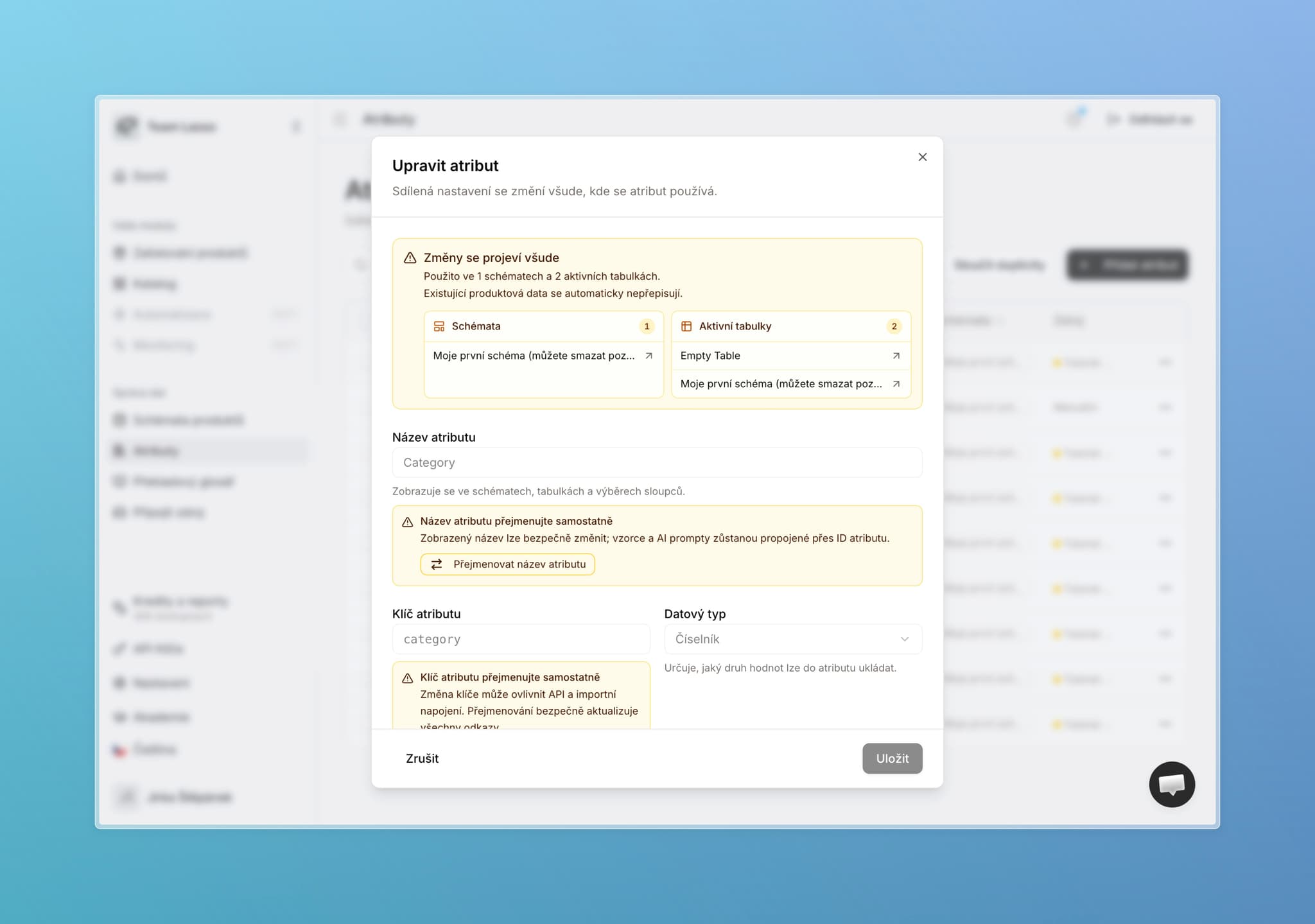
Shared attribute
One canonical definition for the whole app.
- Fixed: name, key, data type, description, and other parameters (enum values, language, text and image validation).
- Change them in attribute settings (open from the side panel) and the update applies everywhere. Before you confirm, you always see which tables and schemas are affected.
- What stays flexible per assortment: AI enrichment, column order, exports, and rich-text templates still live on the specific table or schema. Same as before: experiment freely, then save settings back to the parent schema when you are happy.
- Browse all shared attributes on the Attributes page.
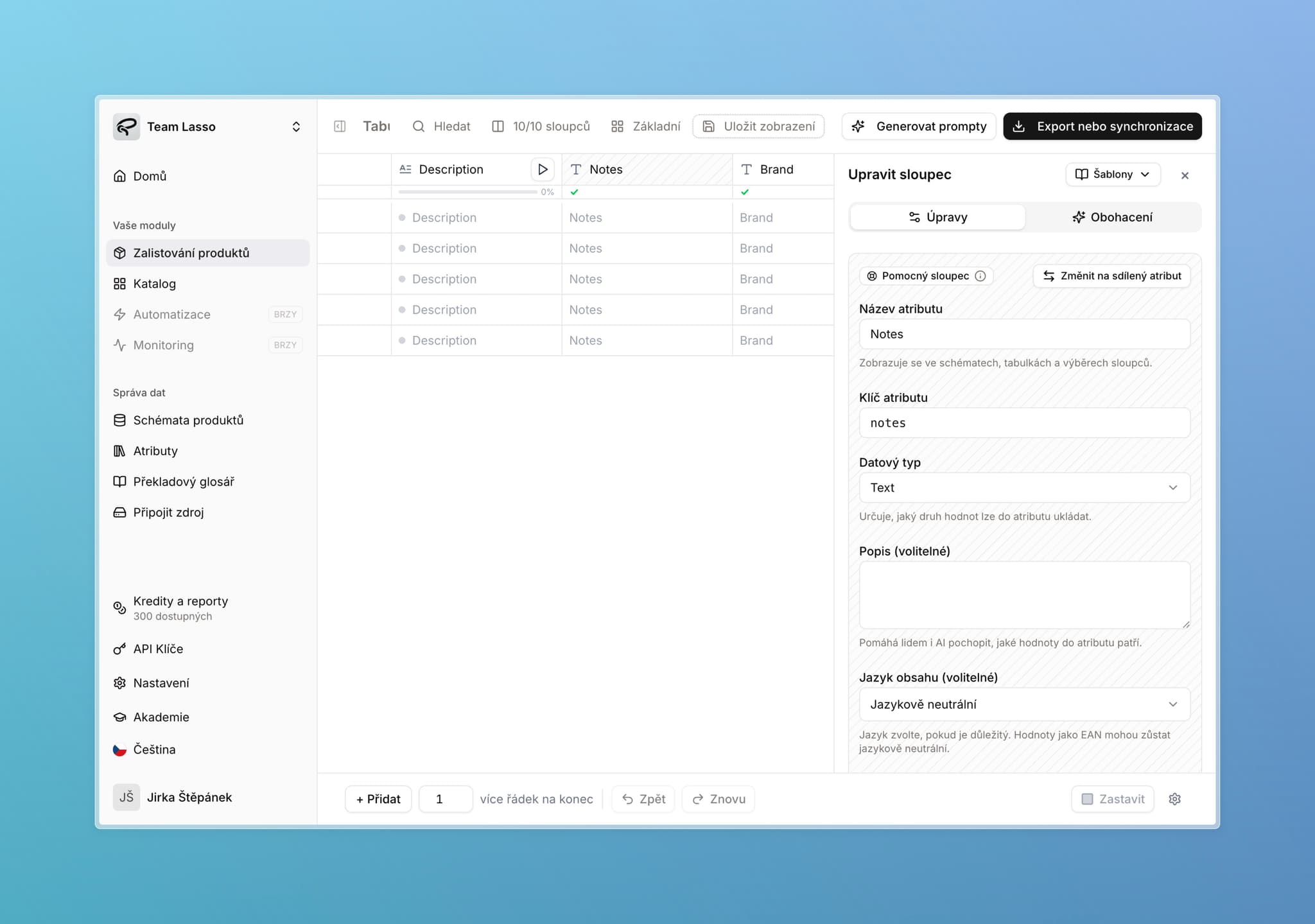
Helper column
Lives only in the table or schema where you created it — exactly how every column worked before.
- Notes, a supplier link, a looked-up photo, working flags — anything that does not belong in your store.
- Does not appear on the Attributes page.
- Does not sync to the catalog. Only shared attributes go out.
- Promote it to a shared attribute with one click — Lasso then applies it to every schema and table that already contains it.
For both types: exports and every other action work exactly as before.
What happened to your existing columns
We did not rewrite or merge anything for you. The split worked like this:
- Attributes you already share with us have unique keys by design — those became shared attributes.
- Every other column is now a helper. They keep working exactly as before, and you can promote them to a shared attribute whenever you want.
- Columns with the same key but different content across two schemas stayed as helper columns — stored where they were, with nothing overwritten.
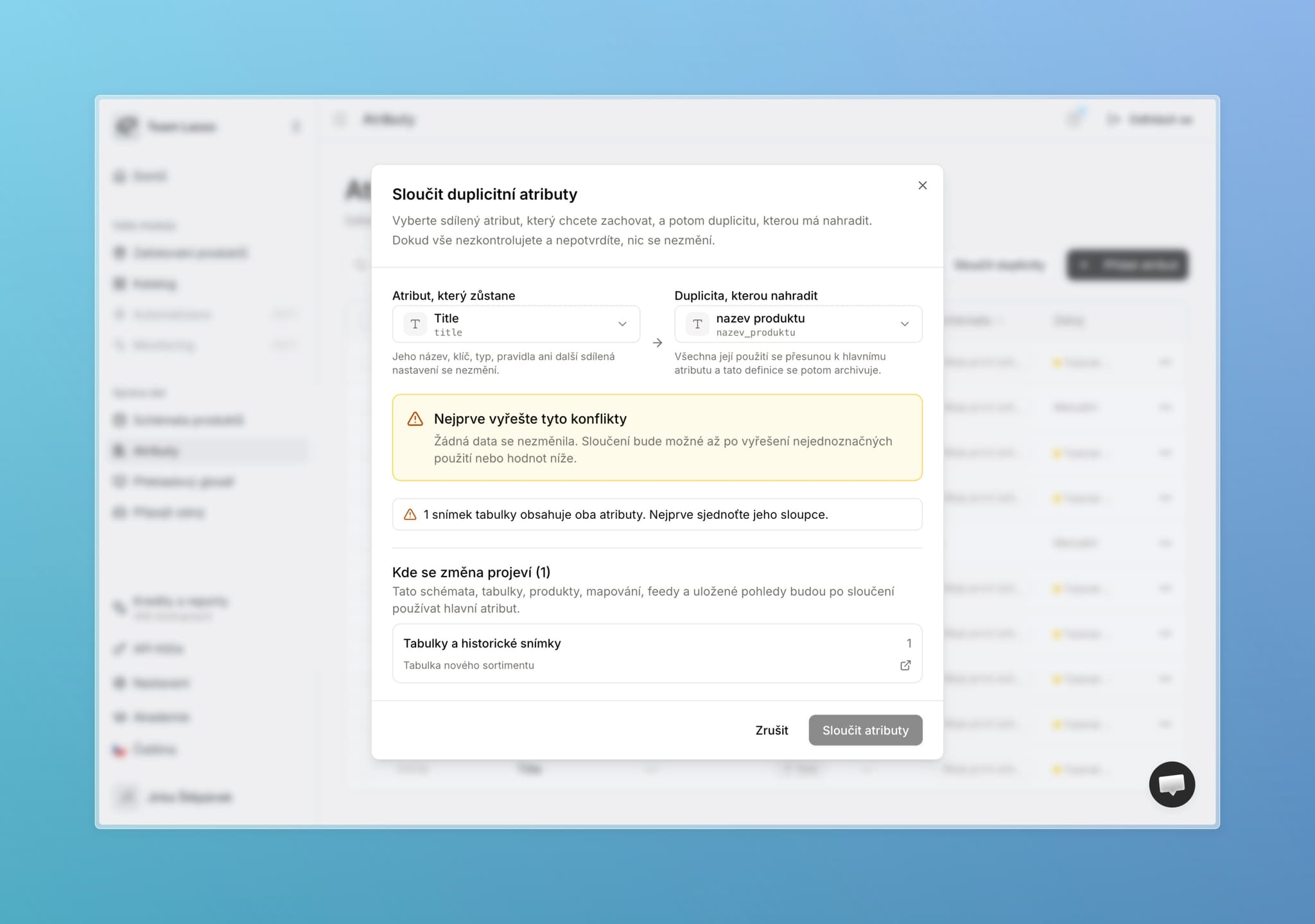
If you later promote such a helper to a shared attribute, Lasso detects the conflict, warns you, and lets you choose how to resolve it. Same logic you already know from Merge attributes on the Attributes page.
How it works in practice
MilujemeSpánek s.r.o. sells pillows and alarm clocks. Each category has its own schema in Lasso.
Both schemas share a set of the same attributes — title, short and long description, gallery. Those are the shared attributes: defined once and synced to the store. Each schema can also have attributes the other does not need — alarm clocks have battery size, pillows have cover material.
For AI enrichment instructions, they want something different per category — functionality for clocks, design for pillows. That now fits together cleanly: the data structure stays the same across schemas, tables, and catalog, while AI enrichment instructions stay specific to each category.
And helper columns? Someone processing a new pillow shipment creates a “supplier phone” column right in the table and has Lasso look up the contacts. Nothing breaks for anyone else, nobody else is affected, and that column never reaches the store.
When a battery-powered pillow shows up, they add the existing battery size attribute to that one table in two clicks — without touching the schema. On the site it lands under the right attribute.
What you gain
- Faster schema setup. Add an existing shared attribute to a schema in two clicks.
- Smarter suggestions. “Suggest new attributes” now prefers attributes you already use somewhere — both in the table and right after AI extraction.
- See impact before you confirm. Every attribute shows which tables and schemas use it.
- Consistency without hand-chasing. You do not have to wonder whether a change will break the site, mappings, or catalog.
- A cleaner catalog. Only what belongs goes into sync.
Deletion and archiving
Removing an attribute from a table or schema destroys nothing — the attribute stays available to use elsewhere.
Deleting from the Attributes page is different: that removes the attribute from the whole database and can affect the catalog and historical tables. So we added archiving — the attribute is hidden for future use, but history stays intact. You can restore it anytime.
Access and API
Roles. Editing shared attribute definitions and promoting helper columns falls under “Manage schemas and attribute dictionary.” Everyday users without that permission still have full freedom for what they need daily: AI enrichment, column order, exports, helper columns.
Admins can also unlock part of an attribute definition for others — specifically adding and editing allowed values on enums and tags. For a color attribute, anyone on the team can add “red” as soon as you start selling it — no need to ping an admin. It is toggled per attribute, so where you want values locked down, leave it off. We covered how roles work in the previous changelog.
API. Existing integrations keep working unchanged. Only new parameters were added — language, for example.
Schema linking. Historical linking of multiple schemas still works, but you can no longer set up new links. Shared attributes take over that role — same outcome, more reliably.
More updates in this release
Attributes and enums
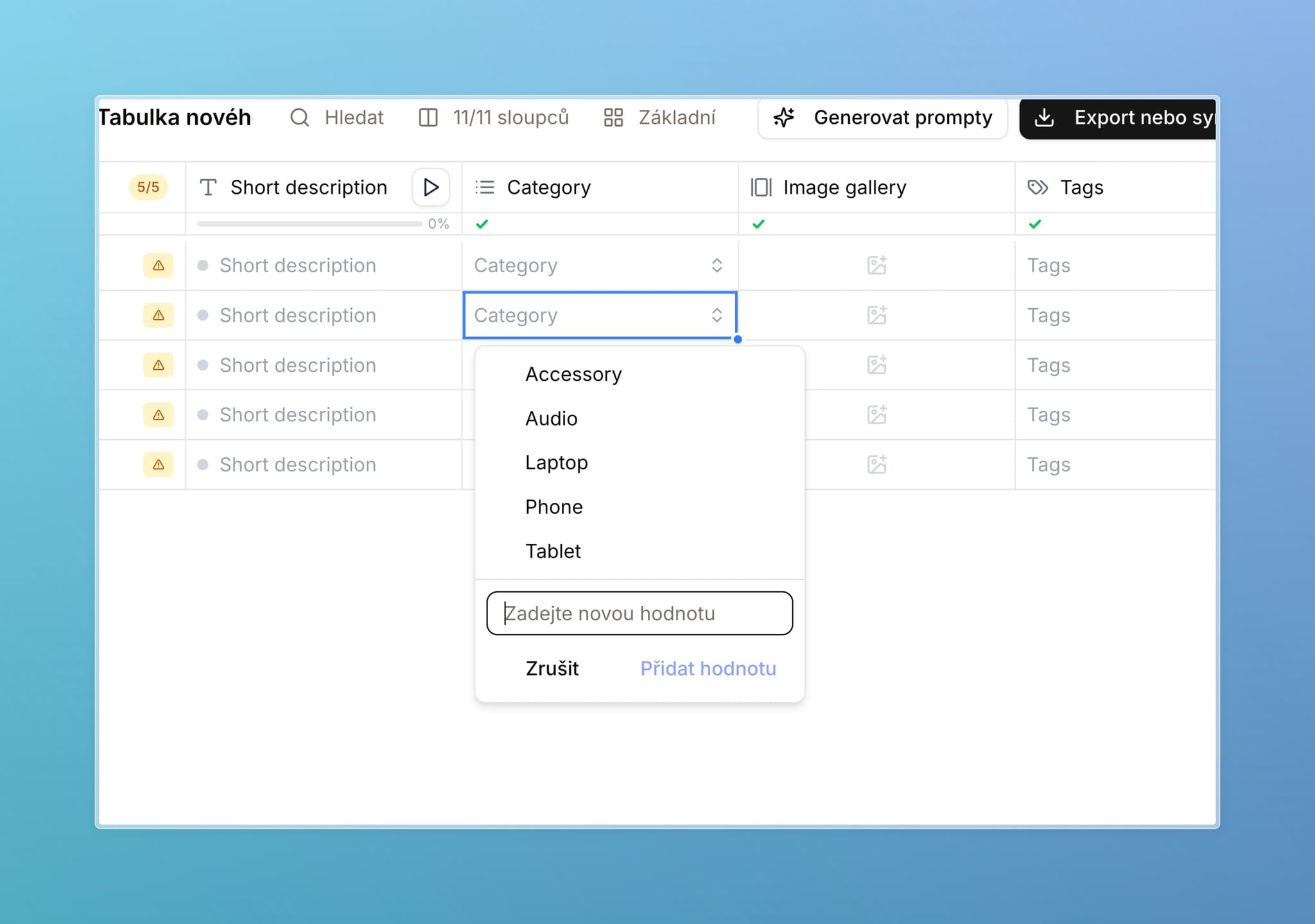
Add new values right in the cell. For enum and tags columns, you no longer need to open settings — need a new color? Add it in one click where you are working. Existing values can be edited the same way. Whether your team has this option is controlled by an admin per attribute.
The Attributes page can do more. Fully edit, add, and deduplicate attributes there — plus new filters for faster orientation.
Attribute language. Optionally set a language on each attribute. For now it is mainly used by the API, but we plan to use it more — filtering, catalog, enrichment.
Text length validation. Set minimum and maximum character counts on text attributes. Nothing is blocked — out-of-range cells are simply marked invalid so you notice. We know many of you handle this today via AI enrichment instructions; this is a more reliable check. In later updates we will follow with automatic repair and regenerating text to fit the limit.
Working in the table
A much faster table. Large datasets are noticeably snappier — we tested up to 2,000 columns. Adding and working with thousands of new rows is faster too.
Excel-like navigation. Tabs, enters, drag, new shortcuts, Escape to close the side panel, more reliable copy-paste and Ctrl+Z.
New schema from a table. Have a table that already looks right? Create a schema from it in table settings (gear icon).
Table duplication. Someone shared a table without edit rights? Make your own copy and work there.
Decimal separator by language. Czech shows a comma, English a period. Reminder: export and API return the value as a number — how Excel renders it depends on your Excel settings.
“Show keys in header” moved to table settings (gear icon, bottom right).
AI and enrichment
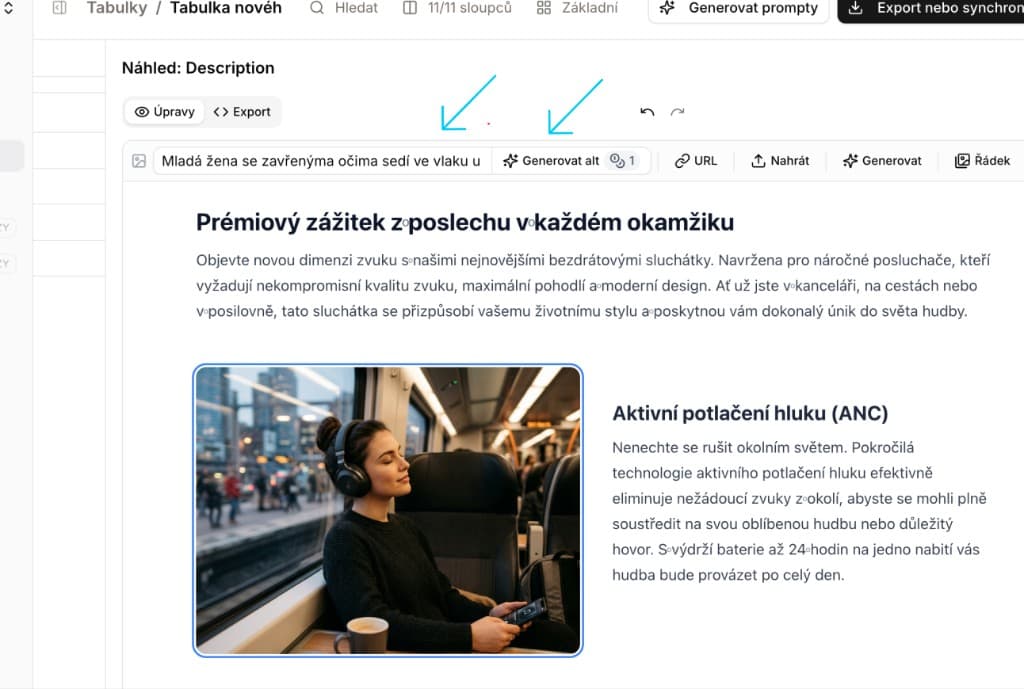
Alt text from uploaded images. In the rich-text editor for templates, you can regenerate and edit alt text even for freshly uploaded images. AI takes into account what is actually in the photo.
Reliability
Automatic error reporting. When an error hits in the app, we learn about it immediately — without you having to report it. Only technical error details are sent, not your product data. Keep writing to us — we appreciate it — but if you forget, we already know. We want this to reinforce our commitment to keeping the app stable.
New emails. We reviewed every email the app sends. They are clearer, nicer, and in your language.
Fixes and improvements
Performance and stability
Last week several companies kicked off very large enrichments at once and others slowed down for a few dozen minutes — results arrived later than they should have. Sorry about that. We made a series of changes so it does not happen again. Lasso also now warns you when you are about to enrich a really large batch (over 1,000 credits) — just a confirmation you click through; nothing is blocked.
- Fully rewritten credits system — the app handles thousands of users at once and live-syncs current balances between them.
- More resilient live attribute sync.
- Faster adding and editing when working with thousands of new rows.
Attributes and schemas
- Fixed a bug where some schemas showed fewer columns than they actually had.
- Fixed several issues around schema back-sync when editing a column in a table (“update schema”).
- Duplicate names with different keys no longer block table work.
Enrichment and formatting
- AI image fix — edge cases where an image needed a second pass before passing validation are resolved. It now works on the first try (formats, resolution, and similar).
- Smoothed out potential errors when generating rich text into templates.
- Fixes for format columns — mainly support for various JavaScript and Excel functions and preview display for different value types. We are continuing fixes here and plan a deeper redesign to simplify this column type.
- Better support for copying complex instructions out of the app and back (including conflict handling when names collide).
Export and catalog
- Cleaned up “never export” and “always export” logic. We also handle edge cases — for example a required column that must never go into an export. Better catalog compatibility and clearer display in the app.
Accounts, roles, and access
- Stronger passwords. Stricter rules for new passwords across the app. Existing passwords stay valid.
- New role option: user can see all schemas.
- Authorized users can now choose whether they see all jobs and schemas, or only their own.
- Onboarding tutorials for new users now respect their specific role.
- More small sign-in fixes.
Small fixes
- Fixed missing source-file preview in tables when the file was imported (not extracted).
- Fixes around saving views.
What's next
Next month we keep simplifying the app: better catalog work, schema creation and editing, references to other products, and more performance work.
Thank you for every piece of feedback — we truly appreciate it.